
Job hunting is mostly repetitive work dressed up as something stressful: read a posting, figure out if you're a fit, rewrite your resume slightly, write a cover letter you'll never reread, track where you applied, prep for an interview, repeat. None of that requires brilliance. It requires consistency, which is exactly where an AI assistant like Claude is genuinely useful, as opposed to just trendy.
The part most guides skip is the very first step: finding the postings in the first place, fast, before 400 other people apply. Below I'll show you how to connect Claude to Apify so it can pull fresh LinkedIn postings directly into an Excel sheet, plus the rest of the workflow , tailoring your resume, mock interviews, company research, and tracking applications.
TL;DR: Claude can speed up the repetitive parts of job hunting: finding fresh postings, tailoring your resume, rehearsing interviews, and tracking follow-ups. The workflow below connects Claude to Apify so you can pull recent LinkedIn roles into Excel, then use Claude to prepare without inventing experience. Next, build proof for those applications with DevOps projects that get you hired.
1. Set up Claude Desktop with the Apify connector
This is the piece that turns Claude from "chatbot that gives advice" into "assistant that actually goes and fetches live job postings for you." It takes about five minutes.
Step 1: Install Claude Desktop
Download Claude Desktop for macOS or Windows from claude.ai/download and sign in with your Claude account.
Step 2: Create an Apify account and grab your API token
- Sign up for a free account at apify.com if you don't already have one.
- In the Apify Console, go to Settings → API & Integrations.
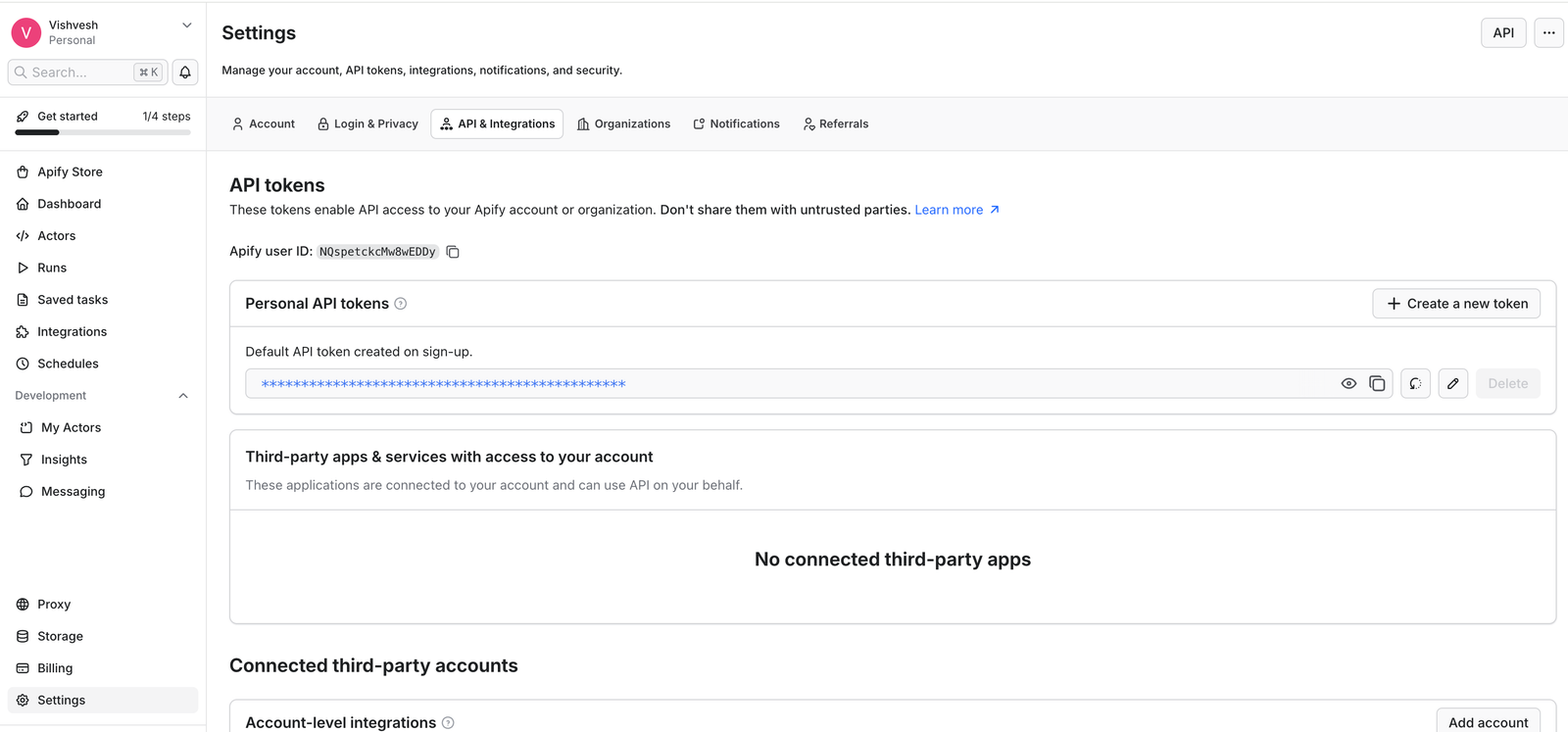 3. Create a new API token (or copy an existing one) and keep it somewhere safe as you'll paste it into Claude in the next step.
Step 3: Install and configure the Apify connector in Claude
- In Claude Desktop, click on + symbol → Connectors → Add Connectors → Browse connectors.
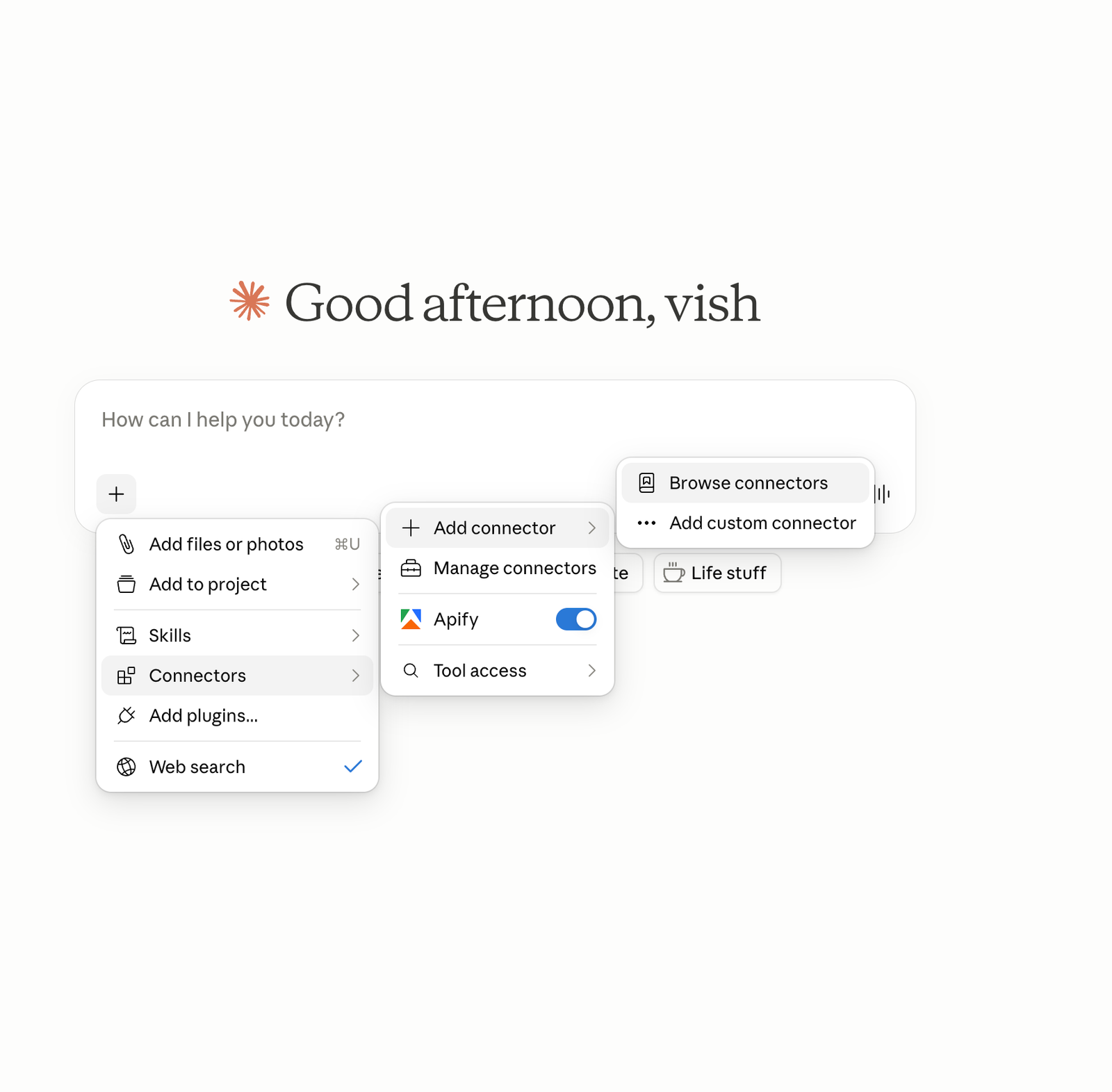 2. Search for **Apify MCP server**, select it, and install it.

Step 4: Turn it on for your conversation
Click the + button in the chat box, hover over Connectors, and toggle Apify on. It'll now show up as an available tool in that conversation, and Claude can call it whenever a prompt needs it.
Heads up: custom/directory connectors in Claude run from Anthropic's cloud, not your laptop, so this works the same way whether you're on Claude Desktop, claude.ai, or the mobile app once it's connected.
2. Pull 40 fresh DevOps and Cloud Engineer jobs into Excel
Once the connector is enabled, especially if you are targeting DevOps Engineer or Cloud Engineer roles, attach your resume to the conversation and send this prompt:
"My resume is attached. Go on LinkedIn using Apify and give me 40 jobs that have been posted in the last 24 hours for the role of DevOps Engineer and Cloud Engineer in Canada, and give me that in an Excel sheet."
Claude will use the Apify connector to run a LinkedIn scraping Actor, pull postings filtered to the last 24 hours, cross-reference the roles against your resume, and hand you back a downloadable .xlsx file with the listings, company, title, location, posted date, and link, ready to scan and apply from.
Run this once a morning and you're job hunting with same-day postings instead of competing with everyone who already applied three days ago.
A few tips to make this more useful over time:
- Narrow by city if "Canada" returns too much, try "Toronto, Ontario" or "remote, Canada" in the prompt.
- Ask Claude to flag duplicates against your tracker (more on that in Step 5) so you're not re-reviewing jobs you already passed on.
- Re-run it daily rather than weekly, the entire point of filtering to the last 24 hours is catching postings before the applicant pile-up.
3. Turn your resume into a living document
Start a Claude Project (or just a dedicated conversation if you don't need persistence) and upload your current resume along with a few of your strongest past performance reviews, project write-ups, or portfolio pieces. Ask Claude to pull out the underlying achievements, not just job titles in plain language:
"Read my resume and these project docs. List out every concrete achievement you can find, with metrics where possible. Don't rewrite anything yet, just extract."
This step matters more than people expect. Most resumes bury the actual impact under vague responsibility statements. Getting a clean inventory of what you've actually done makes every later step faster.
4. Tailor per job posting, not once for everything
The biggest mistake in resume writing is having one version and hoping it fits every posting. Instead, paste the job description in and ask Claude to match it against your achievement inventory:
"Here's a job posting. Based on my achievement list, which of my experiences are most relevant, and how would you reorder/reword my resume bullets to speak directly to this role's requirements?"
You're not asking Claude to lie or invent experience, you're asking it to do the matching and rephrasing work that a human reviewer would otherwise have to do for you. Keep everything factually accurate; just let Claude help surface the right emphasis.
5. Use it as an interview sparring partner
Before an interview, paste in the job description and ask Claude to run a mock interview, especially if you are preparing for DevOps interview questions or Kubernetes interview questions:
"Act as the interviewer for this role. Ask me one question at a time, wait for my answer, then follow up like a real interviewer would , push for specifics, ask about edge cases, don't move on until the answer is solid."
This works especially well for behavioral and system-design style questions, where the value isn't the "correct" answer but practicing how you structure a response under a bit of pressure. Claude can also give you direct feedback afterward on where an answer was vague or ran too long.
6. Research the company without falling down a rabbit hole
Turn on web search and ask something specific instead of "tell me about this company":
"Search for recent news about [Company] , funding, leadership changes, product launches, layoffs , from the last six months. I want to know what's actually happening there right now, not their About page."
This turns 45 minutes of scattered browsing into a five-minute briefing, and it means you walk into an interview able to ask an informed question instead of a generic one.
7. Keep a tracker that updates itself
This is the part most people skip, and it's the part that saves you from quietly losing track of forty open applications. Keep a simple running log , a markdown table, a spreadsheet, whatever , and paste updates into Claude as they happen:
"I just applied to [Company] for [Role] today. Add it to my tracker with status 'Applied.' Also, [Other Company] moved me to a final round next Tuesday , update that row."
Ask Claude to periodically summarize: how many applications are in each stage, which ones have gone quiet longer than two weeks and might need a follow-up nudge, which interviews are coming up this week.
Does a Claude AI job search actually work?
A sample of what this workflow looks like in practice , not a verified testimonial, just an illustration of the pattern. Swap in your own results here once you have them.
Picture someone running the LinkedIn pull every morning for two weeks straight, applying same-day to postings under 24 hours old instead of three days old, and using the mock-interview step before every call. The mechanism behind why that helps isn't mysterious: less competition per posting at the moment you apply, and a rehearsed answer instead of a first-draft one in the room. That's the actual lever here , speed on application, repetition on practice , not magic.
If you try this workflow and it gets you real interviews, I'd genuinely like to hear about it and update this section with your story.
What this doesn't replace
Claude won't get you a job. It won't make a weak resume strong if the underlying experience isn't there, and it can't sit in the interview for you. What it removes is the friction around the repetitive parts , finding postings, tailoring, tracking, rehearsing , so the energy you do have goes toward the parts that actually require you: the conversations, the judgment calls about which roles are worth pursuing, the follow-through.
Used that way, it's less "AI gets you a job" and more "AI clears the busywork so job hunting doesn't quietly become a part-time job of its own."
If you've found a workflow that works differently from this, I'd like to hear it , find me on the socials linked in the footer.
Frequently asked questions
Can Claude AI actually help me find a job?
Yes, but indirectly. Claude doesn't have its own job board. Connected to a tool like Apify, it can fetch live LinkedIn postings, and it's genuinely useful for resume tailoring, mock interviews, and tracking applications. The job search itself is still on you.
Is Claude AI job search free to use?
Claude has a free tier, but connectors like Apify-via-MCP currently require a paid Claude plan. Apify itself has a free usage tier that covers light scraping.
Is it legal to scrape LinkedIn job postings with Apify?
Scraping publicly visible job postings sits in a legal gray area and depends on jurisdiction and LinkedIn's terms of service. This guide is for personal job-search use, not redistribution or commercial scraping at scale.
Do I need Claude Desktop, or does this work in the browser/app too?
The connector setup happens once in Claude Desktop, but once enabled it works the same in claude.ai and the mobile app, since custom connectors run from Anthropic's cloud rather than your machine.
Vishvesh Patel is a DevOps engineer who writes hands-on guides on Docker, Kubernetes, Terraform, CI/CD, AWS, and Linux. He builds the tutorials, roadmaps, and browser playgrounds at DevOpsLesson to help engineers go from beginner to job-ready.


